Phishing in the name of domain.cz: what the spoofed email revealed
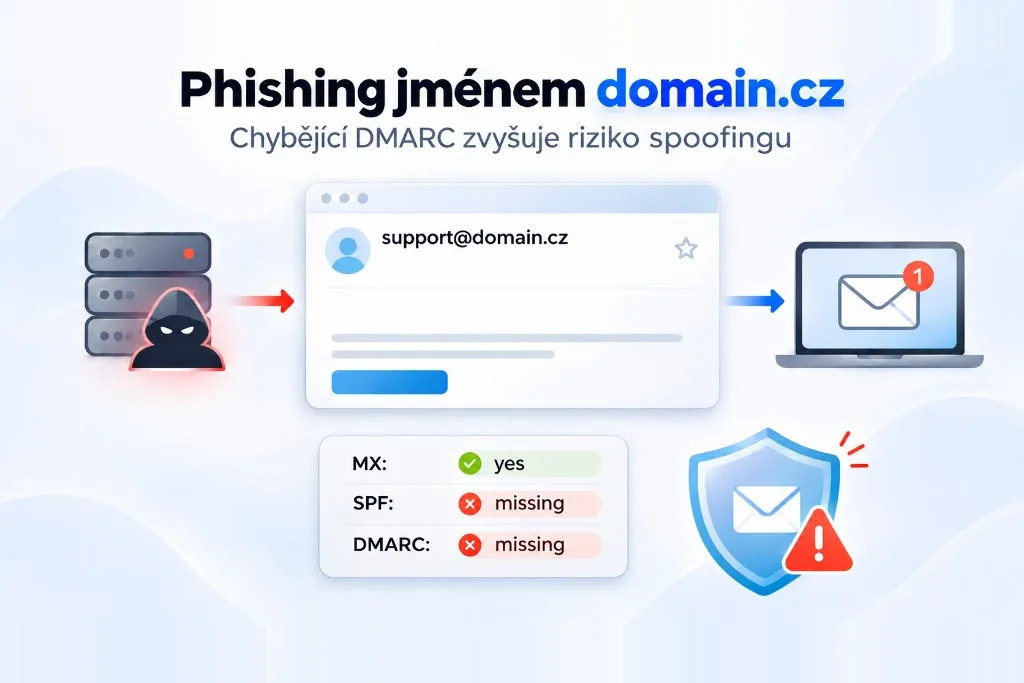
A breakdown of two phishing emails, one of them spoofing support@domain.cz: what the headers showed, what was missing from the domain's DNS, and how to set up SPF, DKIM and DMARC on your own domain.
At 13:09 CET on 10 November 2026, an email from Noreply <support@domain.cz> landed in support@agencjezatrudnienia.pl. It claimed an automatic payment had failed, services for agencjezatrudnienia.pl had been suspended, and the fix was to renew manually via a “View invoice” button. The button didn’t lead to any registrar. It pointed into the wp-content folder of an unrelated website, northwoodpark.co.uk. Forty-five minutes later a second email arrived with the same text, a different sender and a different link.
The mailbox sits on a mail server we run, and our spam filter delivered both. So we dug in: the headers, the DNS of domain.cz, and the CZ.NIC registry. The domain is held by ACTIVE 24, s.r.o., a Czech domain and hosting provider. They confirmed they didn’t send the email, and the headers back that up. But the domain had no DMARC or SPF record, which is exactly what receiving servers use to spot spoofing far more reliably than by reading the message itself. ACTIVE 24 has known about this since 10 November, and nothing had changed by the time we published.
A template dressed up as another hosting company
The subject line of both emails imitated the name of a different Czech hosting provider. Four of its letters weren’t Latin, though: а, Н, і and с were Cyrillic. A person can’t tell the difference, a computer can, and a filter looking for a specific brand name can easily miss it. The attackers didn’t even host the logos. They embedded thumbnails straight from Google Images: one belonged to the imitated provider, the other to the British host Krystal. Speculation: the template was probably left over from a campaign against another provider’s customers.
The attacker didn’t need to know anything about the recipient. The “suspended” domain was simply lifted from the address the email was sent to, and the expiry date was set to the day of sending. With one template and a list of addresses, every message reads like a notice about a specific customer’s specific service.
Two emails, two different routes
| Email 1 | Email 2 | |
|---|---|---|
| Delivered | 10 Nov 2026, 13:09 | 10 Nov 2026, 13:54 |
From |
support@domain.cz |
support-klarnarefund@telesys-japan.com |
Return-Path |
sf21@www1071.sakura.ne.jp |
same as From |
| Sending server | www1071.sakura.ne.jp, IP 219.94.129.81, Japan |
Alibaba Cloud DirectMail, IP 8.219.25.24, Singapore |
| SPF / DKIM / DMARC | none / none / none |
pass / pass / pass (policy none) |
| Rspamd score | 4.93 of 15 | 2.41 of 15 |
| Link pointed to | northwoodpark.co.uk |
sandboxwp.sfadev.com |
The first email is textbook spoofing. The attacker wrote support@domain.cz into the From field but sent the message from shared hosting run by the Japanese provider Sakura Internet. According to the Received headers, it was handed to the server’s mail system by a local user account, sf21. Speculation: that points to a hijacked hosting account or a planted script, but we haven’t verified it. Either way, it tells you nothing about who the attacker is or where they are.
The second email didn’t spoof anything. It came from the domain telesys-japan.com through Alibaba Cloud and passed SPF, DKIM and DMARC. We don’t know whether the attacker controls that domain or abused someone’s account. It makes no difference to the point: DMARC confirms that a message really comes from the domain in From. It says nothing about whether that domain can be trusted, and RFC 7489, section 6.7, says so explicitly. Rspamd even subtracted points for the successful authentication, so the second email scored lower than the forgery. The klarnarefund in the address also hints at a different kind of scam. Speculation: the attackers reuse the same infrastructure across several campaigns.
Why the first email got past the filter
The spf=none result on the first email is about the envelope domain www1071.sakura.ne.jp, not domain.cz. SPF only checks the envelope and never looks at the visible From field. DMARC is what connects the two: it requires SPF or DKIM to pass for the same domain that appears in From. That’s called alignment. Rspamd logged DMARC_NA for domain.cz: the domain hasn’t published a policy, so the receiving server had no instruction from the owner on what to do with a forgery.
Points came from FORGED_W_BAD_POLICY (3.00), URI_COUNT_ODD (1.00), AUTH_NA (1.00) and R_MIXED_CHARSET (0.25) for the mixed scripts in the subject. FROM_NEQ_ENVFROM and FORGED_SENDER, which flag a mismatch between From and the envelope, carried zero weight, since plenty of legitimate newsletters and invoicing systems have that mismatch too. One rule actually lowered the score: MIME_FROM_MX_GOOD (−0.10), because the domain in From has a working mail server, perimeter.active24.cz. The total came to 4.93. The 15 in the header is the reject threshold, and in Rspamd’s default setup a message only gets marked as spam at 6. So the filter did notice something was off. It just lacked the one signal that would have tipped the message over the line, and a DMARC policy from the domain owner could have supplied it.
The links led to other people’s WordPress sites
Both links pointed to WordPress sites with no connection to hosting or domains. sandboxwp.sfadev.com looks like a development install by its name. VirusTotal flagged that second link as malicious when we checked on 11 November. Speculation: both sites were compromised and are being used as throwaway hosting. Their owners most likely have nothing to do with the campaign.
We ran the first link through urlscan.io, an isolated scanner. The scan ended up on a plain Google page. urlscan.io refused to scan the second link at all. Bouncing scanners to Google is a common phishing-kit trick: the kit recognises an automated scan by its data-centre IP or browser fingerprint, sends it elsewhere, and only shows the fake form to real visitors. So we have no record of what the recipient would have seen, and we don’t claim the page was harvesting cards or passwords. The full links are deliberately left out of this article.
Why domain.cz
The imitated hosting provider publishes DMARC with p=reject on its main domain. On the variant of its name without a hyphen, which it most likely holds precisely to prevent abuse, it also has v=spf1 -all and sp=reject for subdomains. Spoofing its address wouldn’t get past servers that check DMARC. That’s exactly the setup every domain with an abusable name should have, and the provider deserves credit for it. Speculation: that’s why the attackers didn’t put the imitated brand’s address in From, and reached instead for an unprotected domain whose name sounds plausible in an email about domain invoices.
What was in the DNS of domain.cz
We checked the DNS at 22:33 and again at 23:15 CET on 11 November 2026 through the public resolvers of Cloudflare (1.1.1.1), Google (8.8.8.8), Quad9 (9.9.9.9) and CZ.NIC ODVR (193.17.47.1), and directly against the authoritative servers alfa.ns.active24.cz and beta.ns.active24.cz. Every one returned the same records. An independent EasyDMARC scan at 22:47 came to the same conclusion: no DMARC, no SPF, no DKIM detected, a score of 0 out of 10. We’re publishing both: the EasyDMARC report (PDF, 11 Nov 2026, 22:47) and the raw DNS query output (TXT, 11 Nov 2026, 23:15).
| Record | Result | What it means |
|---|---|---|
| Holder (CZ.NIC) | SB:GLOBE-SGLO000001, ACTIVE 24, Prague 8; registrar REG-ACTIVE24 |
ACTIVE 24 holds the domain |
| MX | perimeter.active24.cz, mx2.active24.com |
The domain receives mail |
| SPF | The only TXT record is MS=ms99892746, no v=spf1 |
No list of servers allowed to send for the domain |
| DMARC | _dmarc is a CNAME to www.domain.cz, which has only an A record, no TXT |
No policy |
| DKIM | 9 common selectors all end up at the same CNAME | Doesn’t prove DKIM is missing |
| DNSSEC | The zone is signed | Zone answers can be verified cryptographically |
The name _dmarc has no record of its own in the zone. What the zone does have is a wildcard that sends any name to www.domain.cz, even a random one like nextrey-test-x7q.domain.cz. So a DMARC lookup doesn’t get “no such name” back. It gets pointed at a web server that has no TXT record. For a receiving server, that’s the same as having no DMARC at all. The fix is easy, though: under RFC 4592, an explicit TXT record at _dmarc.domain.cz takes precedence over the wildcard.
The nine DKIM selectors we tried (default, selector1, google and others) all hit the same CNAME too. But a DKIM key lives at selector._domainkey.domain, and only whoever signs the mail knows the selector. If one had been published explicitly, it would override the wildcard. So we’re not claiming domain.cz has no DKIM. For the first email it doesn’t matter anyway, since the forgery wasn’t signed.
The zone’s SOA record shows serial 2018061402 and primary server ns.globe.cz. Speculation: if the operator follows the usual YYYYMMDDnn serial format, the zone was last changed on 14 June 2018. That format isn’t mandatory, though, and some DNS systems generate serials differently. The holder ID SB:GLOBE-… together with ns.globe.cz hints at an older, inherited domain. That it got overlooked when DMARC was rolled out elsewhere is only our guess.
ACTIVE 24’s main domains are protected
We ran the same queries against active24.cz and active24.com:
_dmarc.active24.cz   "v=DMARC1; p=quarantine; sp=quarantine; pct=100; rua=mailto:dmarc-report@active24.cz; ..."
active24.cz          "v=spf1 mx ip4:81.95.96.0/20 ... include:spf.protection.outlook.com ... -all"
_dmarc.active24.com  "v=DMARC1; p=reject; rua=mailto:dmarc-report@active24.cz;"
active24.com         "v=spf1 -all"
active24.com has exactly the setup you’d want on a domain that shouldn’t send mail: SPF authorises no servers and DMARC asks receivers to reject. So the company knows how to do this, and does it on its main domains. domain.cz isn’t one of them, even though few names suit a “domain invoice” scam better.
Receiving mail doesn’t get in the way. MX records handle inbound delivery, while SPF and DMARC only apply to mail sent in the domain’s name. If no legitimate mail goes out from domain.cz, two TXT records copied from active24.com wouldn’t affect inbound mail at all. If some does, the senders need to be mapped first. We don’t know which is the case.
How ACTIVE 24 responded
We forwarded the first email to ACTIVE 24 support on 10 November. Overnight, a customer success advisor replied (translated from Czech, in full):
Hello, the email in question was not sent by our company; it is a phishing email that was not sent from our infrastructure. If you have any further questions or requests, please do not hesitate to contact us.
That’s true, and the headers agree. Nothing suggests anyone got into ACTIVE 24’s systems or that customer data leaked. But the reply didn’t address the reason we wrote: that the domain can be abused this way.
So on the morning of 11 November we wrote again, with four specific questions:
- Why is no DMARC record published for
domain.cz? - If the domain doesn’t send mail, why isn’t its abuse limited by restrictive SPF and DMARC records?
- Does ACTIVE 24 plan to fix the configuration?
- Can the report be passed on to the person responsible or to the security team?
As of 23:15 that day there was no reply, and the DNS of domain.cz was unchanged. So the company has known about the problem since 10 November, and more than a day later nothing in the domain’s setup had moved. As soon as we get an answer or the configuration changes, we’ll add it here.
What DMARC would have changed for these emails
The first email would have failed DMARC: SPF had nothing to do with domain.cz, and there was no DKIM signature. With p=reject, any server that honours the policy could have rejected it regardless of its spam score. Rspamd can do that if configured to. Since 1 February 2024, Gmail has required DMARC from anyone sending it more than 5,000 messages a day, so among large senders it’s simply expected.
The second email shows where DMARC stops. Against a domain the attacker controls, or whose account they’ve hijacked, it doesn’t help, because the message passes. Nor does it help against lookalike domains such as dornain.cz, or a display name like “ACTIVE 24 Billing” on a completely different address. But the attacker has to fall back on a domain with no history and no reputation, one that can be reported and blocked, and the From field no longer shows a name the recipient recognises. The imitated hosting provider made sure of that. With domain.cz, the attacker got a trustworthy-sounding name for free.
How to check your own domain
The basic check takes a few minutes in a terminal:
dig +short TXT _dmarc.yourdomain.com          # should return "v=DMARC1; ..."
dig +short TXT yourdomain.com | grep spf1     # exactly one "v=spf1 ... -all" record
dig +short MX yourdomain.com                  # who receives your mail
dig +short TXT selector._domainkey.yourdomain.com   # find the selector in the DKIM-Signature header (s=)
If _dmarc comes back with a CNAME instead of TXT, your zone probably has a wildcard like domain.cz, and you effectively have no DMARC.
Then comes the more tedious part: working out who actually sends mail as your domain.
- List every service that sends email in your domain’s name: mailboxes, invoicing, CRM, contact forms, newsletters, transactional email from your app. Anything you miss will come back later as rejected invoices.
- Put them all into a single SPF record ending in
-all. SPF evaluation may trigger at most 10 DNS lookups (RFC 7208, 4.6.4), and everyincludecounts along with any lookups it triggers itself. - Turn on DKIM under your own domain in every service. A signature using the provider’s domain won’t satisfy alignment.
- Start with
v=DMARC1; p=none; rua=mailto:...and read the aggregate reports for a few weeks. Once only forgeries are left in them, move top=quarantineand thenp=reject. Thesp=tag sets the policy for subdomains. - Don’t forget name variants and domains you don’t use. They’re just as useful to a scammer as your main one.
| Domain | SPF | DMARC | MX |
|---|---|---|---|
| Sends and receives mail | v=spf1 include:... -all |
p=none, then quarantine and reject after reviewing reports |
Regular MX |
| Receives, never sends | v=spf1 -all |
v=DMARC1; p=reject; sp=reject |
Regular MX |
| Neither receives nor sends | v=spf1 -all |
v=DMARC1; p=reject; sp=reject |
Null MX 0 . (RFC 7505) |
Null MX only belongs on domains that genuinely don’t receive mail, so keep it off any domain with working mailboxes. For a wider look at what’s publicly discoverable about a system, see our piece on application security audits.
Why we’re writing about this
Both emails reached a mailbox we manage, and both got past our filter. A domain and hosting provider makes the perfect disguise for this kind of scam, because its customers really do get domain invoices. That’s why its own domains, including the minor ones, should be as well protected as active24.com. For domain.cz, two TXT records would do it, and the company has had more than a day since our report to add them. In our view, a domain with that name, held by a company that sells domains, shouldn’t be left without them.
This article reflects the situation as of 23:15 CET on 11 November 2026. If ACTIVE 24 answers our follow-up questions or changes the domain’s configuration, we’ll update it.
FAQ
Was ACTIVE 24 hacked?
Nothing suggests so. The first message came from a Sakura Internet server, and ACTIVE 24 confirmed they didn’t send it. The attacker simply typed someone else’s address into the From field, and SMTP itself does nothing to stop that.
Does DMARC with p=reject stop every spoofed email?
No. Receivers can ignore the policy, and DMARC doesn’t cover lookalike domains, fake display names or domains the attacker controls. The second email in this case passed DMARC. With receivers that do honour it, though, it shuts down direct spoofing of your domain, which is the cheapest route for a phisher.
How can I tell where an email really came from?
Open the message source. What matters is Return-Path, the lowest Received headers added by your own server, and the Authentication-Results written by your receiving server. The From field is whatever the sender typed.
Sources
- EasyDMARC report for domain.cz (PDF). Generated 11 Nov 2026 at 22:47 CET: DMARC missing, SPF missing, DKIM not detected.
- Raw DNS query output for domain.cz (TXT). 11 Nov 2026 at 23:15 CET, four public resolvers and the authoritative servers, including a comparison with
active24.czandactive24.com. - RFC 7489: DMARC. Alignment with the
Fromfield, and thenone,quarantineandrejectpolicies. Section 6.7: DMARC doesn’t tell receivers whether a message is “good”, and receivers don’t have to follow the policy. - RFC 7208: SPF. SPF validates the envelope domain. Section 4.6.4: the 10 DNS lookup limit.
- RFC 6376: DKIM. Section 3.6.2.1: the key lives under
selector._domainkeyand can’t be found without the selector. - RFC 4592: Wildcards in DNS. A name that explicitly exists takes precedence over a wildcard.
- RFC 7505: Null MX. The
0 .record for domains that accept no mail. - NÚKIB (Czech National Cyber and Information Security Agency): Ransomware mitigation, prevention and response (PDF, Czech). Spoofed email can be cut down by checking SPF, DKIM and DMARC on the receiving mail server.
- Rspamd: Actions and scores. Default thresholds: marked as spam from 6 points, rejected from 15.
- Google: Email sender guidelines. Since 1 February 2024, DMARC is mandatory for senders of more than 5,000 messages a day to Gmail.
- CZ.NIC: WHOIS. Holder and registrar of
domain.cz.